Skip to content

App Overview

Shipedge Warehouse Pro is an Android app designed to manage warehouse operations directly from mobile devices. The app enables picking, replenishment, cycle counting, quality control, and more, with Bluetooth scanner support and offline work capabilities.

Shipedge Warehouse Pro is a complete warehouse management solution for Android devices. The app connects to the Shipedge server to synchronize inventory, orders, and locations in real time.

Main features:

  • Inventory and bins management
  • Order picking and packing
  • Location replenishment
  • Quality control
  • Cycle count and blind count
  • Returns and transfers
  • Project time tracking
  • LPN (License Plate Number) management

Current version: 25.7.1 (versionCode: 203)

System requirements:

  • Minimum Android: (Android 5.0 Lollipop)
  • Target Android: (Android 14)
  • Orientation: Portrait only
  • Connection: Requires internet connection for synchronization
  • Storage: Local SQLite database for offline work

Required permissions:

  • Bluetooth (for scanners)
  • Internet and network access
  • Camera (optional, for barcode scanning)
  • Storage (for local data)

Mobile Operations

Perform all warehouse operations from your Android device. You don’t need to be at a fixed station to work.

Bluetooth Scanners

Connect Bluetooth scanners to scan barcodes quickly without manual entry.

Offline Work

Work without internet connection using local storage. Data syncs automatically when you regain connection.

Real-Time Synchronization

Keep your inventory up to date with automatic synchronization to the Shipedge server.

Multiple Features

Access all warehouse operations from a single app: picking, replenishment, counts, quality control, and more.

User-Based Permissions

The menu shows only the features your user account is allowed based on your role in the system.

The app is organized into main modules:

ReplenishmentActivity - This is the initial screen when you open the app. Here you:

  • Sign in with your credentials
  • Configure Bluetooth connection for scanners
  • Verify your device activation

AppMenu - After login, you access the main menu that displays all available features based on your user permissions.
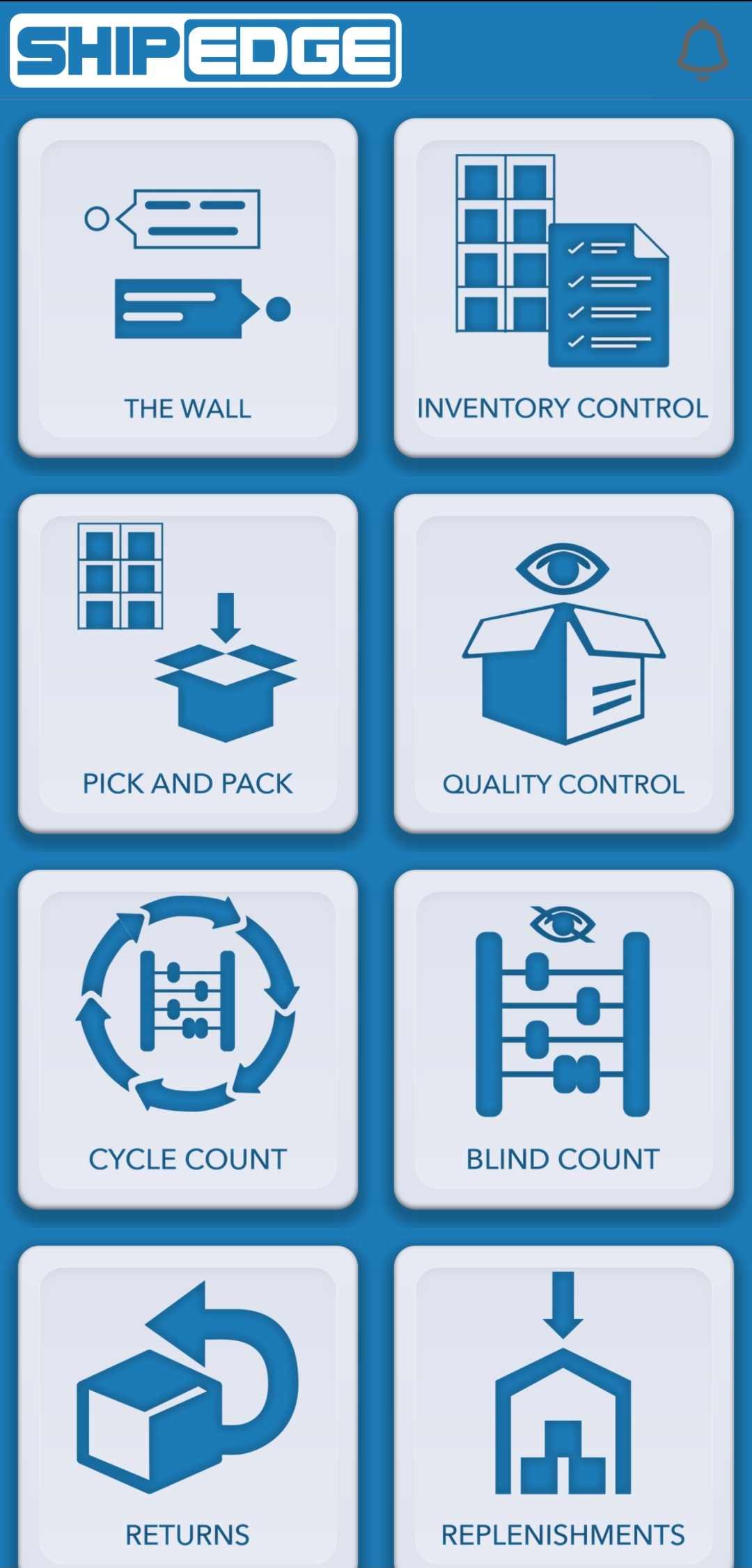
The following operations are available in the app:

Core Operations:

  • Replenishment - Move inventory from reserve locations to picking locations
  • Picking - Select products for orders efficiently
  • Cycle Count - Perform regular inventory counts
  • Quality Control - Inspect products and orders before shipping
  • Bins Management - View, move, and manage warehouse bins and locations
  • Returns - Process returned items and manage reverse logistics

Additional Operations:

  • Transfers - Transfer inventory between warehouses and locations
  • Time Tracking - Record time spent on projects
  • Blind Count - Perform counts without knowing expected quantities
  • Load & Move - Manage blocked bins and load/move operations
  • Wall Module - Specialized warehouse management functionality
  • LPN Management - Handle license plate numbers
  1. Install the app

    Download and install Shipedge Warehouse Pro from the source provided by your administrator.

  2. Launch the app

    Open the app from your Android device’s app menu.

  3. Sign in

    Enter your user credentials on the login screen (ReplenishmentActivity).

  4. Configure Bluetooth (optional)

    If you use a Bluetooth scanner, connect it from the login screen or main menu.

  5. Access the main menu

    After successful login, you’ll see the main menu (AppMenu) with all available features.

  6. Select an operation

    Tap the operation you want to perform. You’ll only see options allowed for your user.

  7. Complete your work

    Follow on-screen instructions to complete your task. You can scan barcodes or enter data manually.

  8. Sync data

    Data syncs automatically with the server when there’s an internet connection.

The app uses a hybrid architecture:

  • Legacy Activities - Traditional Android activities for main features
  • MVP Modules - Model-View-Presenter architecture modules for new features
    • cycleCountActivity - Cycle count with complete MVP architecture
    • loadAndMoveActivity - Load and move with complete MVP architecture

The app uses SQLite to store data locally:

  • Cached inventory data
  • Pending orders
  • Bins and locations information
  • Operation history

Synchronization with the Shipedge server occurs:

  • Automatically when there’s an internet connection
  • After completing important operations
  • When manually requested from the menu

The app supports Bluetooth scanners for:

  • Fast barcode scanning
  • Reduced manual entry errors
  • Increased speed in warehouse operations

Maintain Connection

Although you can work offline, keep your internet connection when possible for real-time synchronization.

Use Bluetooth Scanners

Bluetooth scanners significantly speed up operations and reduce manual entry errors.

Verify Permissions

If you don’t see a feature in the menu, check with your administrator that you have the necessary permissions.

Sync Regularly

Manually sync before closing the app if you worked offline to ensure all data is sent to the server.

Now that you know the app, you can:

App won’t start:

  • Verify your device has Android 5.0 or higher
  • Make sure you have sufficient storage space
  • Reinstall the app if the problem persists

I don’t see all features:

  • Visible features depend on your user permissions
  • Contact your administrator to verify your permissions

Synchronization issues:

  • Check your internet connection
  • Try manually syncing from the menu
  • Offline data will sync when you regain connection

Bluetooth issues:

  • Verify Bluetooth is enabled on your device
  • Make sure the scanner is paired correctly
  • See the Bluetooth Scanner Setup guide for more details

Main activities:

  • ReplenishmentActivity.java - Login screen and entry point
  • AppMenu.java - Main navigation menu
  • MyRep.java - Replenishment functionality
  • PickActivity.java - Picking operations
  • CycleCountActivity.java - Cycle count (MVP architecture)
  • QualityControl.java - Quality control
  • BinesActivity.java - Bins management
  • ReturnActivity.java - Returns processing

MVP modules:

  • cycleCountActivity/ - Complete cycle count module
  • loadAndMoveActivity/ - Complete load and move module

Hardware:

  • Datasource.java - Bluetooth scanner handling
  • MySocket.java - Bluetooth connection management
  • CameraActivity.java - Camera usage for scanning

Next: Installation & Setup or Login & Authentication