
Organize inventory
Move products to the correct locations in your warehouse. This keeps inventory organized and easy to find.
The Load & Move module helps you manage warehouse operations by moving products to locations and handling blocked bins. This feature has two main sections: PUT AWAY for moving products to specific locations, and BLOCKED BIN for managing and relocating bins that are blocked or need to be moved.
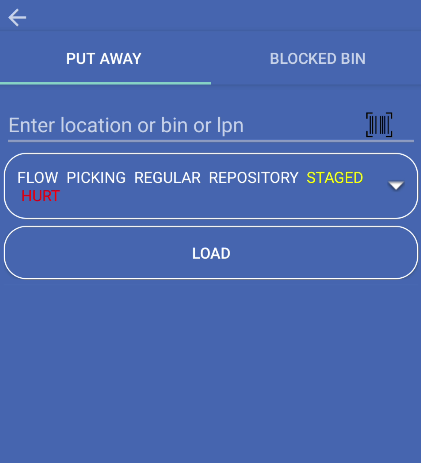
Move products to the correct locations in your warehouse. This keeps inventory organized and easy to find.
Manage bins that are blocked or need relocation. Get a list of blocked bins from the server and process them efficiently.
Access both Put Away and Blocked Bin operations from a single screen. Switch between tabs to work on different tasks.
Use the device camera to scan bins, locations, tags, SKUs, UPCs, or product IDs instead of typing manually.
Open the main menu
From the app’s home screen, tap the menu button to open the main menu.
Select Load & Move
In the main menu, find and tap Load & Move. The Load & Move screen opens with two tabs at the top.
Choose your workflow
You’ll see two tabs:
Tap the tab you want to use. The screen updates to show the selected workflow.
The PUT AWAY tab lets you search for locations, bins, or LPNs and move products to those locations. You can:
This section helps organize inventory by placing products in their correct warehouse locations.
The BLOCKED BIN tab helps you manage bins that are blocked or need relocation. You can:
This section ensures blocked bins are handled correctly and moved to appropriate locations.
The Load & Move screen includes:
Scan bins, locations, tags, SKUs, UPCs, or product IDs instead of typing. This is faster and reduces errors.
Finish processing all items in a list before resetting. This keeps your data accurate and prevents lost work.
Double-check location codes before moving products or bins. This prevents products from going to the wrong place.